B52 ARABIC · Every story, closerLocalization released
Silent Hill: Downpour
B52 Arabic localization for dialogue, menus, maps and documents, with contextual writing, manual review and 30 real gameplay captures. Direct installer or independent Manual ZIP.
Arabic dialogue/subtitles, menus, objectives, maps, collectibles and readable documents; selected visual resources and Arabic title treatment. The optional START_TRAILER promotional trailer remains in its original language.
✓Context-aware Arabic adaptation and consistent character, location and lore terminology
✓Manual editorial review and repeated in-game correction rounds
✓Arabic lettering, right-to-left document layout, readable headings and paragraphs
✓B52 launcher 1.1.1 with direct installation, real progress and bundled update 01.01
✓Independent launcher-free Manual ZIP with Arabic and English instructions
Choose one method: the recommended installer or the independent manual ZIP. Each download has its own steps directly below it; do not use both methods.
Follow these steps after downloading the EXE above. You do not need the manual ZIP for this method.
1
Close RPCS3 completely. Open the EXE and detect or browse to your matching BLUS30565 ISO and actual RPCS3 folder. Folder and drive names may differ on every PC.
2
If official update 01.01 is missing, install the bundled package from the update card, then close RPCS3. Do not reinstall the update over Arabic resources later.
3
Verify the game and files, then install. Follow real byte/file progress, speed and elapsed time. Installation is direct: no original-game backup or full ISO copy is created.
4
You can cancel and complete later while files remain in their recognized state. Cancellation leaves a partial install; it does not restore stock originals.
5
Select English in game and start it yourself after completion. Resolution, 60 FPS and visual patches are optional; results depend on hardware and scene.
This is an independent alternative to the launcher. Download the ZIP above and follow only its steps below.
1
This independent Manual ZIP has no launcher, EXE, DLL, script or official update. Do not copy .xdelta files directly into the game.
2
Use your matching original BLUS30565 ISO, original update 01.01 SHGAME.XXX and the external official Windows x64 xdelta3 decoder. Follow README-INSTALL-EN.txt and verify all required SHA-256 values.
3
Apply 01-Disc.xdelta to the original ISO to create Downpour-Arabic.iso. Apply 02-RPCS3-Files.xdelta to that Arabic ISO to create the cache ZIP. Apply 03-SHGAME.xdelta to the original update-01.01 SHGAME.XXX. Exact commands are in the guide.
4
Verify outputs, extract the resulting cache ZIP, then merge its dev_hdd0 folder into the actual RPCS3 data root. Copy resulting SHGAME.XXX into dev_hdd0/game/BLUS30565/USRDIR/FIOS-UNREALENGINE3/SHGAME/COOKEDPS3.
5
Run Downpour-Arabic.iso specifically and select English in game. The manual process creates a separate Arabic ISO but does not back up emulator cache originals. Do not combine it with the launcher or another localization.
Restore or remove
No automatic original-game backup or restoration is provided. Returning to stock requires your owned original ISO and clean original resources/update for this title. Reinstalling only the update over Arabic cache is insufficient. Preserve saves, home and unrelated emulator settings. Optional performance settings have a separate small restoration record.
Use a lawful game copy. Packages do not contain the full game or BIOS. Compatibility and package requirements take precedence over generic advice.
Compatibility and requirements
Owned USA PS3 BLUS30565 multilingual ISO with matching source hashes and official update 01.01, on RPCS3 / Windows x64. Select English in game. BLES, other ISO builds and third-party modified sources are unsupported. Physical PS3 compatibility is unverified. FPS/resolution options are hardware dependent.
Launcher version 1.1.1, separate from localization version 0.16.4. It checks the supported original and installs directly into the selected ISO and game resources. No original-game backup or complete ISO copy is created. Keep access to your owned originals if you need to return to stock.
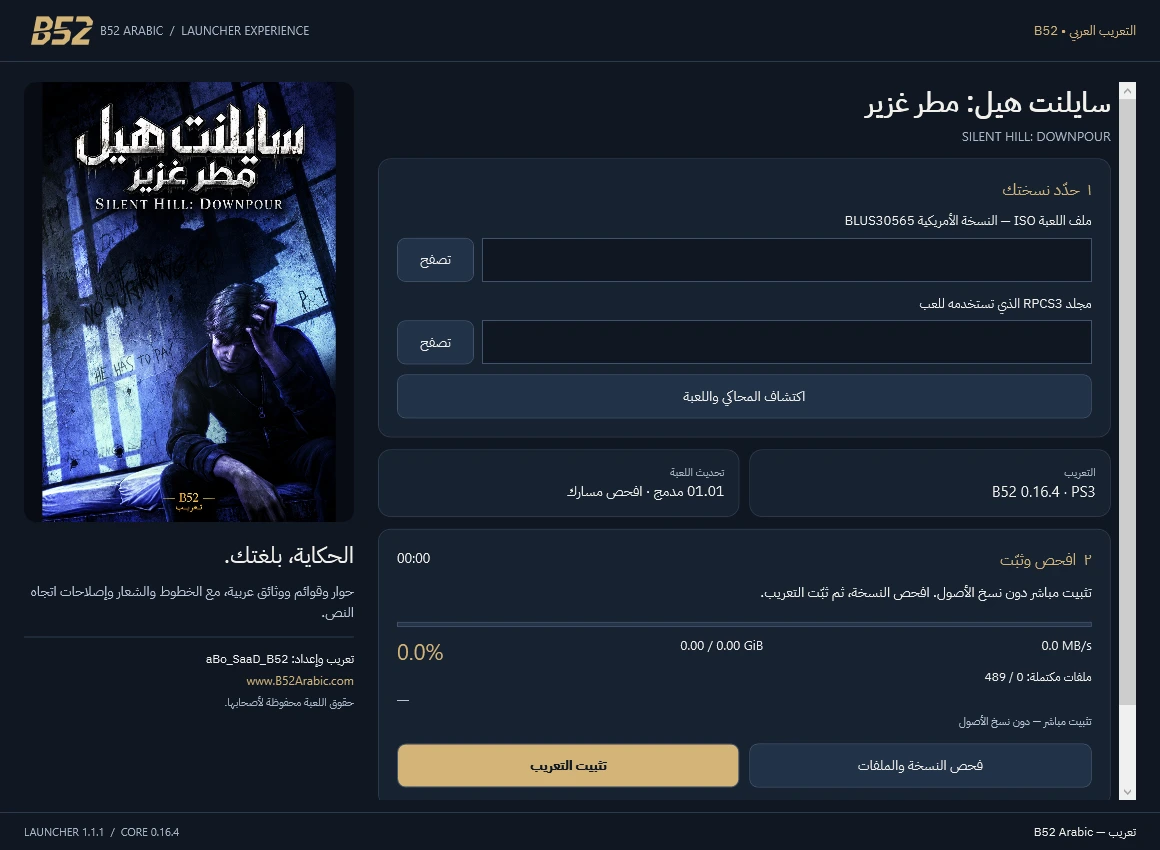
B52 launcher 1.1.1 interface; not a gameplay screenshot.
Local installation can work offline with the required files. Do not assume a publisher certificate; do not disable Windows protection. Start the game yourself after installation.
Choose your download
Installer recommended for guided setup. A portable ZIP must be fully extracted; manual packages and add-ons have separate requirements.
B52 Launcher — direct installation
Detect your ISO and RPCS3 or select them manually. Verify and install with real progress, without original-game backups or a full ISO copy. Update 01.01 is bundled. The Manual ZIP is an independent alternative.
Three data patches with Arabic and English instructions. Requires your matching BLUS30565 ISO, update 01.01 and external xdelta3. No EXE, DLL, scripts or official update included. Read the guide; do not copy .xdelta files into the game.
Localization 0.16.4
345.7 MB · Published 2026-10-27
267061349786b35dcf2f7d00a5034ddb8c3bcba745e64ff55bc7587623012752Download Manual ZIP