Preserved project images; not new gameplay captures from the latest launcher build.
God Hand — preserved Arabic project image 1God Hand — preserved Arabic project image 2God Hand — preserved Arabic project image 3God Hand — preserved Arabic project image 4God Hand — preserved Arabic project image 5
Download and install the localization
Choose one method: the recommended installer or the independent manual ZIP. Each download has its own steps directly below it; do not use both methods.
Follow these steps after downloading the EXE above. You do not need the manual ZIP for this method.
1
Close PCSX2, download the launcher EXE and open it. Manual ZIP is an independent alternative and is not needed with the launcher.
2
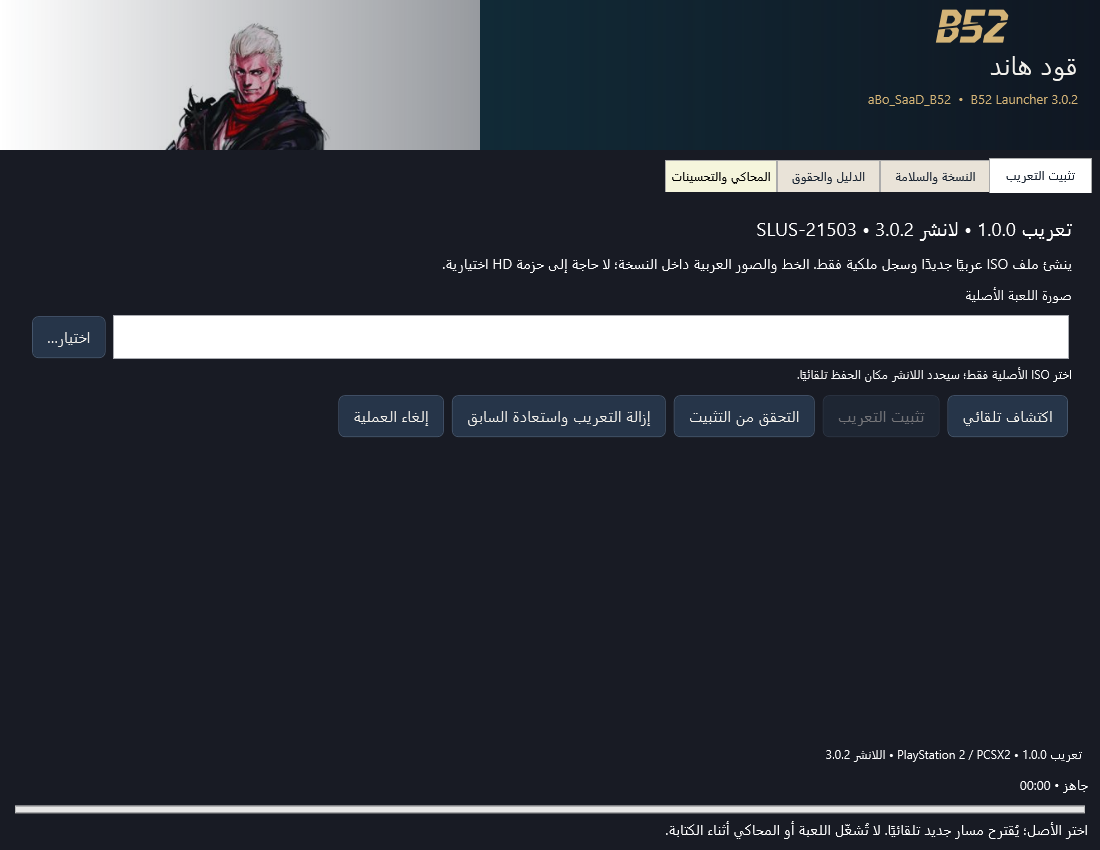
In تثبيت التعريب choose اكتشاف تلقائي, or اختيار… beside صورة اللعبة الأصلية. Select the original USA SLUS-21503 ISO and wait for checksum verification; do not select an Arabic copy.
3
After الأصل مطابق appears, click تثبيت التعريب. The launcher creates a separate Arabic output and preserves the original. Changing the output folder is optional under المحاكي والتحسينات.
4
Follow the phase, counter and elapsed time until installation and verification finish. To cancel, use إلغاء العملية and allow rollback to finish. You can then use التحقق من التثبيت.
5
Optional HD: under المحاكي والتحسينات select PCSX2 and its data folder if customized, then click تثبيت HD العربي المرفق. Wait for validation and activation. Core Arabic does not require HD.
6
In the same tab choose a device tier, or read local hardware and select its suggestion, then click تطبيق إعدادات هذه اللعبة. Selecting a tier alone does not apply it. Start the Arabic output yourself from the emulator when ready.
This is an independent alternative to the launcher. Download the ZIP above and follow only its steps below.
1
Extract the complete ZIP into a separate folder and read README_AR.txt. B52 Launcher is not required.
2
Use Python 3.10 or later and the included source delta application tool with the original SLUS-21503 ISO, following the guide commands. Choose a new output file; never replace the original.
3
Wait for patch application and match the output checksum from the guide. Copying a patch into the emulator is insufficient.
4
Start the Arabic output yourself. This ZIP contains core localization only, without optional HD. To remove it, delete only the output you created.
Restore or remove
Use the launcher restoration action or follow the manual guide. Keep the original and receipt. Stop if a managed file was changed afterwards.
Use a lawful game copy. Packages do not contain the full game or BIOS. Compatibility and package requirements take precedence over generic advice.
Compatibility and requirements
PlayStation 2 USA / NTSC-U, SLUS-21503. Windows 10/11 x64 and .NET Framework 4.8. HD and emulator settings support PCSX2 2.9.129 or 2.9.130. No cutscene-dialogue subtitles are added. Suggestions are not a frame-rate guarantee.
Launcher version 3.0.2, separate from localization version 1.0.0. It checks the supported original and manages a separate Arabic installation. Keep the original and installation record.
Preserved interface preview; it may show an earlier interface build.
Local installation can work offline with the required files. Do not assume a publisher certificate; do not disable Windows protection. Start the game yourself after installation.
Choose your download
Choose B52 Launcher V3 for guided installation and restoration, or Manual ZIP for the complete core localization without running a B52 executable. Both use the same Arabic payload. Read the exact game and tool requirements.
B52 Launcher V3 — guided installation
Checks the supported game, creates a separate Arabic copy and manages verification and restoration. Shows the affected files and supported options before installation.
Core Arabic patch and required Arabic resources with clear installation and restore instructions. No B52 executable or optional HD enhancements. Some games need the external patching tool identified in the guide.
Localization 1.0.0
5.9 MB · Published 2026-10-23
eae25c1987cd96744183e2e338a8082f706a80c2e27a7ceb3983077e5cb932d7Download Manual ZIP